
Swagger Kaden
Swagger has served his 9 years in Time Inc. and created several MAC and IPhone apps with a512KE llsi, he has done his exclusive jobs in Mellon Marry College of newspapers. He is specialized in editorial techs entertainment apps.
Google+


Swagger Kaden's Latest Posts
New iOS Accessories – Make the Best Use of Your iPhone & iPad

If you’re getting bored with your handset and think there’s nothing left interesting, then our new roundup of iOS accessories might help resurrect your relation with your device. Some of them are really worth seeing, let’s have a peek at them.
Bracketron

The Swing N Clik ($100) is something only golf lovers could know its worth. It is a whole package that tells them how they can improve their game. It includes a tablet mount, a tripod, an iPhone mount and a Bluetooth remote Click-IT. Users control the camera via this remote when they are about to hit the ball. You can place your pre-order as it’ll start shipping in the month of September.
Algoriddim

Have any party to jazz up with your pals? The DJ Connect ($100) allows you to pre-cue (pre-listen) music on your iOS device. It also works fine on the Mac running OS X 10.6 or later. The device packs a 30-pin dock connector cable, Lightning connector cable and a USB wire for previewing Djay app on the Mac.
Fresh-e-Tech

If you’re interested in keeping unique things around that may leave a grin on anyone’s face, then All-Terrain Sound ($80) might grab your interest. It’s a Bluetooth speaker in the form a small tire designed to give you a great listening experience while you’re on the go.
Hypercel

The Superdock ($35) is a power station where you get your device fully charged. Could be used as a stand when not in use. It features a 5ft long USB cable and employs a Lightning-connector plug. Perfect for office environment where you need to keep an eye on all of your belongings.
New iOS Apps to Help You Get More Out Of Your iPhone

Just trying to reach out to the things that just have been released or updated? You are at a right place here. Our new roundup of iOS apps might help you get your favorite app that you were looking for. Let’s give them a view to know what comes new;
Slack

If you’re after a team-communication app for your handset that can truly fix all of your problems regarding email? Then it’s a time to have a peek at Slack. With this handy app, you access all the team communication at one place. Give it a little try to know how it exactly works.
ScratchJr

Developed by MIT, the newly-released Scratchjr for iPad allows kids to know about basic coding skills to develop interactive games and stories. Kids with intelligent senses will be really enjoying it. So, are you ready to give your kids a break?
Vibrance

Have got tired of using those ordinary filters? Here I’ve known about an app that keeps your pics up with wide range of options. It lets photographers share, create and apply their self-made photo filters in no time. In simple words, it’s the one you’ve been looking for.
NFL Now
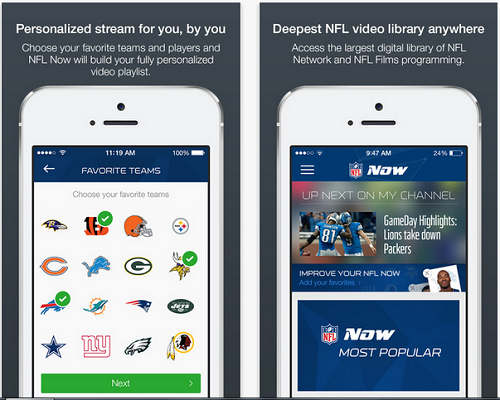
The all-new NFL Now is a godsend for football fans. It brings everything including videos of your favorite team, game highlights and clips from NFL archives. All these things would attract any football enthusiast easily. So enjoy seeing your favorite player, NFL teams and coaches right on your iPad.
iPhone 6’s Front Panel Leaked Ahead of the Official Release
As the official release of iPhone 6 is approaching near, the things around the tech society are getting higher. Today, we are up with some leaked images that could be of Apple’s next iPhone. It is iPhone 6’s front panel showed from different angels in these images.

According to the Taiwanese blog AppleClub, these are the real images giving us an idea of Apple’s next flagship smartphone’s design. The report doesn’t talk about sapphire glass material that has been floated around for a long time. There’re also some reports saying Apple will be launching not one but two iPhones as it did last year with iPhone 5S and 5C.
There’ll be two iPhones with different screen sizes; one with 5.5-inch while the other one with 4.7-inch screen size. Both of them are supposed to be coming later this year. September 19 is said to be the most believable date when Apple will be announcing its plans for 2014.

Anyhow, there isn’t a single word from Apple for its upcoming flagship smartphone so far. So, take this post as a grain of salt as nothing has been confirmed yet. We’ll let you if there comes anything official from the company. Stay tuned!
3 Recently-updated iOS Apps This Week

This weekend we are up with some new and cool stuff that’ll be getting your special attention. Our new roundup of latest iOS apps might hold your favorite app that you were looking for. To see what we bring new, you need to scroll this page down.
Distiller

It’s a free and must-have app for whiskey lovers. The new update combines a new ‘Distiller Community’ that allows users to share their views on particular whiskeys with their pals. If you were after that sort of stuff, then get downloading Distiller if you haven’t already.
Cal List

There’ll barely a person with no tasks to do. Almost everyone has something for doing. So, relying on any calendar app isn’t a bad idea. Keeping this in mind, we bring you a new app Cal List this week. Coming with simple and intuitive interface, the app makes it easy for you to organize your life with great ease.
Foursquare

That’s biggie for those possessive about good food. The Foursquare It’s a free version launched specially for iPhone users. The app knows exactly how to get you the best places around you. With Foursquare, you don’t need to get worried about the food taste while you’re with your special one.
Latest iOS Accessories This Week – Make Your Life Easier

Change is very necessary in our lives as we soon get bored with the things that we have been using for a long time. So this time we are up with some new stuff that’ll go awesome with your iOS device. Let’s check out what our new roundup of latest iOS accessories brings in..,
USBFever

The telephoto zoom lens ($50) comes with two shooting options – you can use either 12x lens or a 24x lens. Each of them is specially designed to go well with your iPhone 5S. Available in black and smoky black.
Yantouch

The Diamond+ ($149) might seem you a magic ball at first sight. It’s a Bluetooth speaker that can offer 10hrs of full entertainment on a single charge. In other words, it’s a little ball that spices up your loving moments and doesn’t let you feel bore.
Typo 2

The Typo 2 ($99) is a perfect companion for those not good at typing on touch screens. It offers users to have a BlackBerry-like keyboard affixed to the bottom of their iPhones. It’ll be debuting in the month of September, so now you can place your pre-order to get it reserved.
MobiMates

Want to make things a little funky around you? This MobiMates ($25) might do a job. It behaves like an iPad stand making your surrounding a bit interesting. It is available in brown or white and could be your mate while you’re sleeping.
Get Wello iPhone Case and Stay Updated with your Health Vagaries

The new iPhone cases keep coming at regular interval of time. Sometime they are just ok and sometime they shock us by new innovation. That’s what happens this time, the new Wello iPhone case claims to keep an eye over your health concerns including blood pressure, temperature, heart rate and blood oxygen level. Above all, you can see your ECG waves fluctuating according to your heartbeat.
The inventive case holds some built-in sensors, which come handy when you need to find your health conditions, which could be anything from heartbeat to blood pressure. You shouldn’t be getting assistance of a doctor in these little issues as far as Wello is with you.

You aren’t gonna have some specialized medical courses to operate it. You only need to have an iPhone and of course Wello, that’s it. Check your health status over regular period of time like daily, weekly and monthly basis. The creator of this case promises to come with more new things such as glucose scale, which may take lesser time than anyone thing.
The man behind this new idea, Mr Hamish Patel (CEO & Founder of Wello) who has been prepping for that sort of thing for last two years. He talked about the limitation of device as it’s not only for US folks but also for those who live in the developing countries where you can find lots of lack over health issues. The Android users can also have Wello but as a standalone device not as a case for their handset. Though, you might also see a 3rd party case for Android users.
It is now available for Pre-order in USA, China, Canada, India, Singapore, UK, Hong Kong and EU. It’ll set you back at $199, but early buyers can save up to $10 if they place an early pre-order.
Get Your Photos & Videos Done With ColorTime

If you are after some apps or software that can do a magic to your photos or videos, then here we are up with a useful iOS app, ColorTime that helps you manage the color casts of videos and photos in a simple way. It offers a gesture-based user interface allowing users to get used to easily.
At the top of screen, you see different controls for getting different results. There’s not any complex work involved; all you need to drag your finger on the screen. So, enjoy playing with your photos and videos with this app and get downloading it if you haven’t already.
Here’s the description of ColorTime mentioned at App Store;
Use ColorTime’s gestural interface to color grade your photos and videos in real-time. The powerful grading tools enable you to make your images and videos look beautiful and professionally finished. With a single touch gesture, accurately manipulate color or tone, in the highlights, midtones and shadows. VertexGrade technology allows you apply grades to organic, freeform selections.
If you’ve done anything wrong while using ColorTime, then no fuss, it gives you one-tap redo, undo and other reset options that’ll get you back to the desired state. Overall, it’s an impressive and powerful tool for color-grading videos and photos in an exclusive way.
Download Link (App Store)
Hands-on With Latest iOS Games – Double the Fun at Weekend

What do you do in your idle time? If it is just sitting and thinking about anything else, then you are doing wrong to yourself as you can have fun on your iPhone or iPad. Today, we are up with some thrilling titles that will be jacking up your holidays. Let’s find what comes new in our roundup of latest iOS games.
80 Days

Are you fond of going on adventures? If so, here’s an app that lets you explore the world in just 80 days like Phileas Fogg did in 1872. It is up to you how you go through your expedition; it could be done by using submarine, airship, steam-train and mechanical camel. Overall, it’s a good game from all perspectives and can turn your boredom into a thrilling fun.
Deep Loot

It’s no more different from the 80 Days but engages players in a more funny way. Users need to fight, dig and swim through depths of ocean to find out hidden treasures and get more coins. They can spend the hoarded coins for getting bigger boats and upgrading the equipment. It’s a simple game that doesn’t involve anything complex.
Micromon

If you are after fighting games, then Micromon is a perfect pick for you. Coming with 130+ animated monsters, players will surely be enjoying great fun. Here’re the product features mentioned at Apple App Store.
-
Over 130 monsters to capture & evolve!
-
Fully animated monsters and characters.
-
A vivid and massive world to explore.
-
An epic storyline with tons of quests to complete.
-
Challenge other tamers to become the best!
-
Customize monster skills to fit your own strategy.
-
Hours of addictive gameplay.
-
Universal app with Game Center Support.
-
Test your skills against real players in the online multiplayer arena!
Latest iOS Accessories This Week
This time, our new roundup of latest iOS accessories brings you some new ways of making music, holding and charging your iOS devices. To know more about them, you need to scroll the page down.
IK Multimedia

The iKlip Xpand ($50) allows users to make their dream music using this handy stand that can be adjusted either in the portrait or landscape orientation. Music fans would really love the way it works helping you compose your desired music.
Kenu

The Kenu’s Airframe+ ($30) comes handy and provides easy access to the device when you are driving a car. With Airframe+, you can monitor GPS directions, take calls and play music on the go.
Macally

The UniStrip 2 ($50) combines 4 USB ports and an out-dated electrical outlet, allowing users to charge multiple iOS devices at once. So, this seems well especially when you’re out for a family trip. Perfect for school and office environments.
Boombotix

The Boombot Rex ($100) is a wireless Bluetooth speaker that’s water-repellent, portable and works well as a speakerphone. The rechargeable stereo speaker comprises 36mm drivers and is available in white, black, mint, orange, or blue.
Macally

Have kids to be taught? Here’s WiFiSD ($80) makes it easy for you to teach up to five students at once. It lets teachers stream videos, photos and music wirelessly.
Scosche

The BoomBottle H20 ($100) is a waterproof, portable Bluetooth speaker loaded with a passive bass radiator and a 50mmm driver that can play music up to 11hrs on a single charge. Users can now get it through Apple App Store.
Blurr it an iOS App Updated with New Features

mTouchLabson on Saturday updated Blurr it, their photography app specially designed for iOS users with version 2.3. It’s a handy app that lets users blur anywhere on the photo. You can avoid things that you think shouldn’t be showed in the photo.
To blur any selected part, you need to choose the area which you want to hide, that’s it. There’s no complex work involved while operating the app. Simply touch the screen using your finger on the area where you intend to blur. If it is too small, then you can use zoom option to get clear accuracy. Now, you’ve done blurring your pic and share it on the social networking sites.

Here are some product features from App Store;
-
+ Import pictures from Facebook, Instagram, Flickr etc
-
+ Hide your face, body, your friends, or any other secrets from the photo by quick blur
-
+ If the area is small, you can zoom in beforehand to guarantee accuracy of blur
-
+ Different Blur intensity levels
-
+ Flexible Blur Tip
-
+ Save to Photo Library
-
+ Support different resolutions
-
+ Support Facebook and Twitter uploading
The amazing Blurr it v2.3 is now available for $1.99 at Apple App Store.


