
Addison Mel
Addison is an instructor of game design and multimedia developer in some technical college; he is also an active member of Microsoft gaming and app precincts.
Google+


Addison Mel's Latest Posts
Veggie Hipster an iOS Game Makes Your Day

We by nature get bored sticking with the same ordinary things, so like to have more variations around. Bearing this in mind, we bring you a game Veggie Hipster designed to turn your boredom into a thrilling fun.
What’s catchy in the game? It’s about vegetarians and game advocates them in funny way. All you need to avoid the hurdles which are in the form of chicken legs, hot dogs, bacon and hamburgers. Just press & hold the screen to move side-to-side avoiding the obstacles.

It is an easy-to-play game that doesn’t involve any special skill. You get used to with the controls after spending some time and it’ll be difficult for you to say goodbye. First off, it may feel you a little easy but with the progression will get tricky.
Overall, it’s a good game to kill your idle time. It’s better to engage with something than sitting idle. So, give this game a little try and let us know about your views on that in the comment section given below.
Download Link [Apple App Store]
Top 3 Calendar Apps For iPhone Users

It’s very important in our lives to be organized and well-prepared to the things around us. So, getting a calendar app isn’t a bad idea to get things moving on the right track. Here we have assorted some of the best calendar apps for iPhone users so that they can manage their time easily.
Sunrise Calendar

If you are after something handy and also don’t want to spend anything? Then give Sunrise Calendar a little try. Its primary interface allows users to view a list of appointments together with icons showing the type and weather conditions for weather. Over all, it’s a good app for being organized.
Fantastical 2

That’s biggie if you want more out of your calendar app. The Fantastical 2 combines a very easy-to-understand user interface making it more cozy for the users to have their coming plans set on the right track. So, preview all the events and tasks that need to be done today.
Calendars 5

Manage your life with Calendar 5, a handy app to organize your tasks on daily, weekly and monthly basis. You can easily toggle between several options to add or reschedule your events, appointments and other reminders.
Description from the App Store;
”Calendars 5 is smart, excels in both tasks and events and runs on any iOS device you might have. It’s the calendar app you have been looking for.”
Apple Plans to Announce Two iPhones – Rumors

The rumor mill of iPhone 6 doesn’t seem to be ending until Apple announces it officially. This time, we’ll discuss another story that’s being popped up across the different tech blogs. It says, Apple will be launching two iPhones; one with 4.7-inch while other with 5.5-inch screen size.
You may also like this; Apple iWatch Could Come Along iPhone 6
However, there’s no specific word on their names but the story looks to be true as we have seen Apple announcing iPhone 5S and iPhone 5C last year. But this time, there won’t be any difference between the handsets except the screen size. Going for the mid-range device like it did with iPhone 5C isn’t going to work for the company.
If you think both of the flagship smartphones will be announced in September, then you may be wrong. According to the inside sources, Apple has a plan for separate announcements; the 4.7-inch iPhone for September and the 5.5-inch version for later months. It could be a gimmick of marketing strategies to stay in the game.
See Also; Update on Apple iPhone 6 – Some of the Internal Parts Leaked
Anyhow, Apple hasn’t disclosed anything regarding iPhone 6 so far. So, take this post as a pinch of salt and we’ll let you know if there comes anything official from the company. Stay tuned!
4 Can’t-Miss iOS Apps

This time, we are up with some handy iOS apps that’ll surely spice up your experience at iOS devices. One of them helps you edit and shoot video easily and quickly. So, let’s check em out..,
Wiper Messenger

Want to secure everything you do through texting your pals? If so, then get over Wiper Messenger that lets users text and call their friends absolutely free across the globe privately. Just tap ‘Wipe’ to remove a chat or conversation from your handset and your buddy’s phone instantly. So now you’re pretty much sure that your chat isn’t being read by anyone else. It offers HD-quality sound on Wiper calls.
Setstream
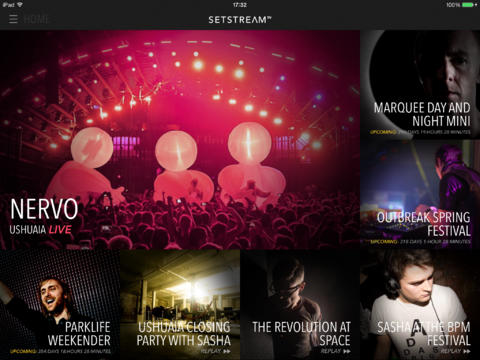
Are you interested in watching live performances of your favorite bands around the globe? Here Setstream does the job for free as it allows the users watch the live shows of their hot bands. Users can stream video from their iPad to the big screen through their Apple TV.
Kinomatic

The infoding.com’s Kinomatic ($2) allows you to edit and shoot video easily and quickly. You can make a short film of different clips by adding audio, text and other editing options. What’s special about this? It helps you make a professional-like video in no time. So, get downloading this app, if you haven’t already.
Modern Combat 5: Blackout

The Gameloft’s Modern Combat 5: Blackout ($7) combines everything needed to rejoice your whole day. Get into the real fun that lets you create a squad, text your team skills and add your friends around the globe for a greater entertainment.
iPhone Apps To Get Your kids On the Right Track

Are you worried about your kids and want to get them on the right track? If so, here we’ve assembled some of the nifty iPad & iPhone apps that’ll surely help you to engage your children with handy learning stuff. Let’s check em out..,
Dino Dog

The StoryToys Entertainment’s Dino Dog ($2) helps your kids to know about Dinosaurs. One thing that comes common in every kid is the curiosity to know more about the mysterious things like magic lamps, witches, superheroes. So, with this app your kids aren’t going to waste their times instead will get knowledge regarding archeology.
State Bingo and Road Trip US

The Niyaa LLC’s State Bingo and Road Trip US ($3) is what every parent would like to have for its kids. Children always take pleasure in visiting different locations. So, this game is no more different from that thought. In the game, players need to pilot a road trip consisting of 50 states by simply answering the questions about the each state.
DragonBox Elements

Worried about your kids as they don’t show any interest in geometry? If so, give this game ($3) a little try. It lets your children learn geometry in no time. It’s a fun that your kids wouldn’t like to quit easily. It largely focuses on the Euclidean geometry including discovering angles and shapes, drawing geometric figures and solving proofs.
Latest iOS Games You Need to Check Out

We are always in a search of new titles that just have been released or updated with new features. So, this time, we have assorted some of the latest iOS games that might turn your boredom into a fun. Let’s find which grabs your attention.
Beyond Gravity

The Qwiboo Ltd’s Beyond Gravity ($1) does exactly what it sounds like. You are in space now and need to jump in-between the planets to get the pickups as many as you can. Users can upgrade their character with lots of power-ups and upgrades. One thing you should be taking care of is you have to be in the right position to get those pickups lied in a curved shape. If you are fine at this, then you can beat it easily.
Transworld Endless Skater

Have some instincts for outdoor skating in public places? If so, give this game a little consideration. The free gameplay might boost your skill and help you explore new ways of skating. The more you stay on your skate the more score you earn. Just try to get more points because if you have more points scored then you can add extra time to the clock. And this enhanced time makes sure your presence on the skate.
Blackwell 1: Legacy

This new game ($2) doesn’t include much of fight and play-work instead is full of dialogue. The point-n-click adventure comes from the studio that has introduced Gemini Rue and Shivah. If you are familiar with these two then can easily expect something big from this new game. It involves a bit of spiritual drama that puts users into a finding of dead folks how did they die.
Apple iWatch Release Date, Specs and Other Rumors

As we all know, Apple will be having some great announcements later this year. It was expected that Apple will talk about its product lineup for 2014 at its annual Worldwide Developers Conference on June 2. But Apple even didn’t hint about its next plans. We only saw a few announcements of its next-gen operating systems, the iOS 8 and OS X Yosemite.
There’re some things that make us believe that Apple will be announcing its all-new iPhone 6 together with long-awaited iWatch in the fall of this year. We have seen Apple introducing HealthKit, a new app that’ll be serving like your family physician on the floor of WWDC event.
It’s the first time Apple is showing interest for health issues. Perhaps, it could be a pressure from its competitors that have introduced health-oriented devices such as Samsung Galaxy S5 which is capable of measuring your heart rate and can track fitness through S Health 3.0 app.
The things get clearer with the report appeared at Apple Insider claiming Apple has hired the sales director of very popular watch manufacturing company TAG Heuer to get assistance for its iWatch launch.
According to the Wall Street Journal, Apple’s long-awaited iWatch is said to pack 10 sensors for tracking purposes. The new smartwatch is likely to hold a 2.5-inch screen with wireless charging ability. Design wise, we can’t say anything for sure as different stories being discussed around the corner.
It is expected that Apple will be announcing its first wearable device together with iPhone 6 later this year. September 19 is supposed to be the most believable date when Apple will be taking the floor.
Treat this post as a pinch of salt as nothing has been confirmed so far from the company. We’ll let you know if there comes anything official from Apple. Stay tuned!
Know How You Can Use Emoji Pics right on Your iPhone or iPad

You might have got an iMessage that contained some pictures that evoke someone else’s emotions. It could be anything like flowers, pics of cars or animals, dancers and smiley faces. Now, you don’t know how to get into this? These pics were known as ‘emoticons’, but nowadays they got a new name called emoji pics. Surprisingly, your iPhone and iPad have an ability to send or receive these pics. All you need to do is to enable them!
Here’s how you enable emoji pics on your iOS device.

- Go to the Setting app on your iOS device
- Hit on General
- Move down to tap on the Keyboard
- Select ‘Add New Keyboard’
- Scroll down and tap Emoji
How to get into Emoji Pics? Follow the steps mentioned down here.
- Open up any application that uses keyboard like Messages app.
- Go for new message as normally do.
- Tap the ‘Globe Key’ after when you got a keyboard popping up.
- Now, you can explore all different section and select the Emoji you like. Tap again on the ‘Globe key’ that’ll get you back on the regular keyboard where you can proceed.

That’s what you need to do! Emoji pics aren’t limited to any specific app as you can find it any app that allows keyboard input. So, enjoy sending Emoji pics to your loved ones using iPads, iPhones, or Macs.
Want to add something? Please feel free and let us know how you look at Emoji pics in the comment section given below.
Top 4 Paid iPhone Apps Gone Free for a Limited Time

What would be your reaction on getting a paid stuff for free? Obviously, it always sounds good. What if we bring you similar stuff getting available for free for a limited time frame? It could be an hour or a week depending on the developer’s mood. Today, you got a chance to download some of the top paid iPhone apps for free. Let’s check em out..,
Discovr Apps

The app comes handy when you’re looking for something new for your iPhone. It helps you find your favorite title in no time. It is suffice to say that every iOS user should be having this nifty app installed on its device. Apart from getting desired app, Discovr Apps will show you recommendations of other apps. Do hurry; it’s temporarily available for free.
Shares for Flickr

Uploading pics on social networking sites is very common among smartphone users. So, this app makes it easy for you to upload your favorite photos with your family, fellows and friends in no time. With this app, users can upload photos from their album to the Flick in a single tap.
App for Google Music HD

Music lovers should be taking this as a godsend opportunity as it’s all free for a time being only. Its’ a new Cloud service for music where you can hoard up to 20,000 songs. Users can have access to all of their songs, genres, playlists, artists, albums in their Google Music Library.
Intervals

Looking for someone who helps you get a desired figure? Give Intervals a little consideration as it offers a simple user interface that you won’t get confused while using the app. With Intervals, you can better manage your workout plans in a comprehensive way.
Apple Rolls Out iOS 8 Beta 3 – Fixes a Number of Bugs

On Monday, Apple released iOS 8 Beta 3 for developers. The update is now available for download OTA (Over-the-air) and can be accessed through Apple’s developer page. It took a time period of three weeks after the last update.
The iOS 8 beta 3 under the build number of 12A4318c brings some bug fixes and improvements as well. It covers some known issues with AVCapture, battery life, backup, authentication, Apple’s Bug Reporter, Bluetooth, CloudKit, CarPlay, extensions, document providers, FaceTime, HealthKit, Family Sharing, third-party keyboards, HomeKit and more.
iOS 8, Apple’s latest mobile operating system introduced at WWDC event on June 2, is scheduled for the final release later this year. It comes with iCloud Drive, Family Sharing, QuickType, Continuity, a new Health app and many more.

Together with iOS 8 beta 3, Apple has also released third Developer Preview of its newly-introduced OS X Yosemite, which is now available as an update via Mac App Store and Apple recommends all the users running previous betas should be updating to this new update.
We’ll keep you posted with the further coming updates from Apple. So Stay tuned!


